

Is your WordPress site ready for the AI tools your team is already using? For most sites, the honest answer so far has been: not really. WordPress 7 is due for release very shortly, and it changes that.
The new version brings three WordPress AI features built into the core platform: the Abilities API, the AI Client, and the MCP Adapter. If you’ve been wondering how AI fits into WordPress beyond the chat widgets and content generators bolted on top, this release is important.
Why WordPress 7 matters for AI
Until now, every plugin that works with AI has developed its own approach to AI models. Each one handled authentication separately, formatted requests in its own way, and parsed responses with custom code. This has resulted in duplication, inconsistency, and a poor experience for site owners juggling several AI plugins and features.
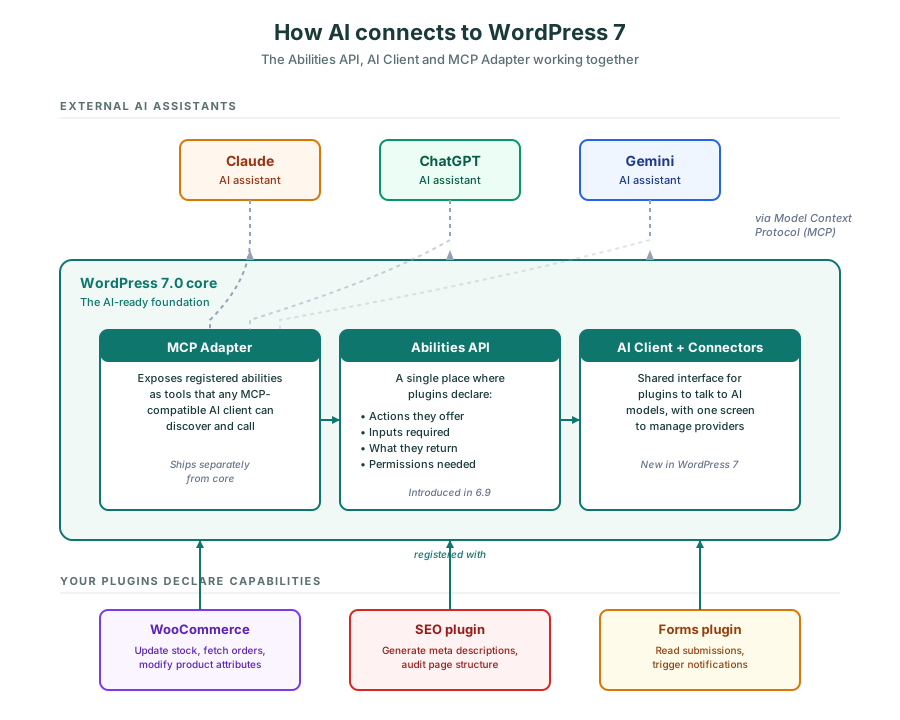
WordPress 7 changes this, so instead of bolting AI onto WordPress, the release builds AI-readiness into the core platform. Three new components do the heavy lifting: the Abilities API, the WordPress AI Client, and the MCP Adapter.
Abilities API: telling AI what your site can do
The Abilities API was introduced in WordPress 6.9 as the first feature. It gives plugins a standard way to register what they can do. A plugin declares:
- The specific actions it offers
- The inputs each action needs
- What each action returns
- Which permissions are required
Those capabilities become discoverable through REST endpoints or through the Model Context Protocol (MCP) Adapter.
For example, if your site uses WooCommerce to sell products. The WooCommerce plugin can register capabilities such as updating stock status, retrieving order data, or modifying product attributes. An AI assistant that connects to your site automatically discovers those capabilities. There’s no need to build custom code for WooCommerce, because the plugin has already declared what it can do.
WordPress AI Client: one connection to many AI models
Before WordPress 7, every plugin that wanted AI features had to build its own connections to providers like OpenAI, Anthropic, or Google. That often meant duplicate setup, multiple API keys, and inconsistent behaviour between plugins.
The WordPress AI Client introduces a shared interface for talking to AI models. Plugins send prompts through one consistent layer, no matter which provider sits behind it.
The Connectors API
WordPress 7 adds the Connectors API alongside the AI Client. It’s a system for managing connections to external services, with a new Connectors screen where site owners configure AI providers in one place.
Once you’ve set up a connection, it’s available across plugins without further setup. AI features become composable across your site. A workflow can pull page data, send it through an AI model to generate descriptions, and write the results back, all without custom code holding it together.
MCP Adapter: connecting WordPress to external AI tools
Model Context Protocol (MCP) is an open standard for how AI assistants communicate with external tools. The WordPress MCP Adapter implements that protocol for WordPress, exposing registered abilities as tools that any MCP-compatible client can discover and call.
The adapter is a separate plugin from WordPress core and was already available before 7.0, but it becomes far more useful now that the new AI foundations are in place.
Once connected, tools such as Claude, ChatGPT, or Gemini can see what your site can do and trigger actions directly. What does that look like in practice? Workflows that would have needed significant manual work or custom scripting are now within reach. For example:
- Batch-updating hundreds of posts with a single natural language command
- Finding all pages with inconsistent attributes and standardising them at scale
- Pulling content from across your site to build reports or summaries
Example workflow: Asking Claude to update WooCommerce stock in plain English
- Site owner asks Claude: “Mark every product in the ‘summer sale’ category as out of stock and add a ‘returning in October“.
- Claude plans the work: Reads the Abilities API to find a relevant tool, identifies
woocommerce_update_stock, prepares the call. - MCP Adapter receives the call: The Model Context Protocol request goes to the WordPress MCP Adapter, which routes it to the right ability
- Abilities API checks permissions: Confirms the connected account has the
manage_woocommerce
capability before letting the action run. - WooCommerce runs the update: The plugin runs its registered action against every matching product. No custom scripts, no manual edits required.
- Claude reports back: “47 products in ‘summer sale’ marked out of stock. Notes added. Want me to schedule a stock review for October?“
What AI readiness means for site owners
Being AI-ready doesn’t mean throwing AI features at every problem. It means your site has the foundations in place so AI tools can work with it safely and consistently. So for your site that translates to:
- Faster setup when new AI features are added
- A single place to manage AI provider connections
- Better security and permission control, because abilities declare what they need
- Less reliance on custom development for every new automation idea that you have
This move mirrors what happened when REST APIs became standard in WordPress a decade ago. Once the foundation and functionality existed, the ecosystem caught up quickly, and sites that were ready benefited first.
How to get your WordPress site AI-ready
Preparing your site for WordPress 7 starts with the basics. Make sure your core, themes, and plugins are up to date, and that you’re running on hosting that supports the latest PHP versions. Beyond that, three things will put you in a good position.
- Audit your plugins. Plugins that follow current standards will adopt the Abilities API and AI Client more quickly. Plugins that haven’t been updated in years are likely to fall behind.
- Tidy your content structure. AI tools work best when content is well organised, properly tagged, and follows consistent patterns. Good information architecture pays off here.
- Review permissions and user roles. The Abilities API ties capabilities to permissions. If your roles are messy, your AI workflows will be too.
If you’d like a structured review, our WordPress audit service covers exactly this kind of preparation. We look at security, performance, accessibility, and, now, AI readiness as part of a wider health check of your site.
Looking ahead with WordPress 7
WordPress 7 doesn’t make your site AI-powered overnight. What it does is lay the foundations so that as AI tools mature, your site can grow with them.
The sites that benefit first will be the ones that have already done the groundwork: clean code, current plugins, sensible permissions, and a clear sense of what they want AI to do for them. If that sounds like a stretch from where your site is today, that’s exactly what an audit is for.
Frequently asked questions
WordPress 7.0 is due for release on 20th May 2026.
Most well-maintained sites will upgrade automatically, as with previous major releases. We will advise our care plan clients and test the release carefully. The bigger work is making sure your plugins and themes are compatible and ready for the new features.
Yes. Existing AI plugins will keep working, but they’ll gradually adopt the new shared infrastructure. Over time, you’ll see less duplication and a more consistent experience across them.
MCP is designed to let AI assistants do the work for you. As a site owner, you don’t write MCP code. You connect an AI tool, such as Claude or ChatGPT, to your site, and it discovers what your site can do via the MCP Adapter.
Security depends on how abilities and permissions are configured. The Abilities API ties each action to a permission, so AI tools only act within the scope you’ve allowed. Treating AI connections like any other powerful login, with strong authentication and least-privilege access, keeps risk in check.
We recommend an AI risk assessement and are advising our clients about this.